| Steps |
Key Sequence |
Screens |
| 1. Enter data into list, L1 |
|
|
| 2. Enter data into list, L2 |
|
|
| 3. Set up Stats Tests |
STAT |
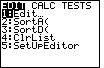 |
| |
 twice twice |
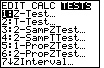 |
| |
4 (for 2–SampTTest...) |
 |
| 4. Select Data |
use left arrow key (if necessary) to move cursor to Data, then ENTER |
|
| 5. Select list, L1 |
(press ALPHA), then 2nd, then 1, then ENTER |
 |
| 6. Select list, L2 |
(press ALPHA), then 2nd, then 2, then ENTER |
 |
| 7. Select test |
Press  twice, then using arrow keys, select desired test, then ENTER twice, then using arrow keys, select desired test, then ENTER |
 |
| 8. Enter no for Pooled |
use left arrow key (if necessary) to move cursor to No, then ENTER |
|
| 9. Calculate P–value |
once, ENTER |
 |
| 10. Scroll down to find more calculations |
Press |
 |
| In this case, the test was Ha: μ1 < μ2;
the t statistic is 4.282; the p–value is 0.99994; the df is 39.06, etc. |