| Steps |
Key Sequence |
Screens |
| 1. Enter data into list, L1 |
|
|
| 2. Enter data into list, L2 |
|
|
| 3. Set up Stats Tests |
STAT |
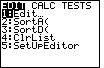 |
| |
 twice twice |
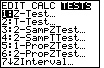 |
| |
APLHA, then x -1 key (for 2SampFTest...) |
 |
| 4. Select Data |
use left arrow key (if necessary) to move cursor to Data, then ENTER |
 |
| 5. Select list, L1 |
(press ALPHA), then 2nd, then 1, then ENTER |
 |
| 6. Select list, L2 |
(press ALPHA), then 2nd, then 2, then ENTER |
 |
| 7. Select appropriate test |
 twice, then use right and left arrow keys to move
cursor to appropriate test, then ENTER twice, then use right and left arrow keys to move
cursor to appropriate test, then ENTER |
 |
| 8. Calculate F–Test |
once |
 |
| |
ENTER |
 |
| 9. Scroll down to find more calculations |
Press once |
 |
| In this case, the test was Ha: σ1 > σ2;
the F statistic is 4.611; the p–value is 0.00124; etc. |
| 10. Draw the test |
repeat steps 1 through 7 (the data should already be stored!), then
once, then ENTER |
 |